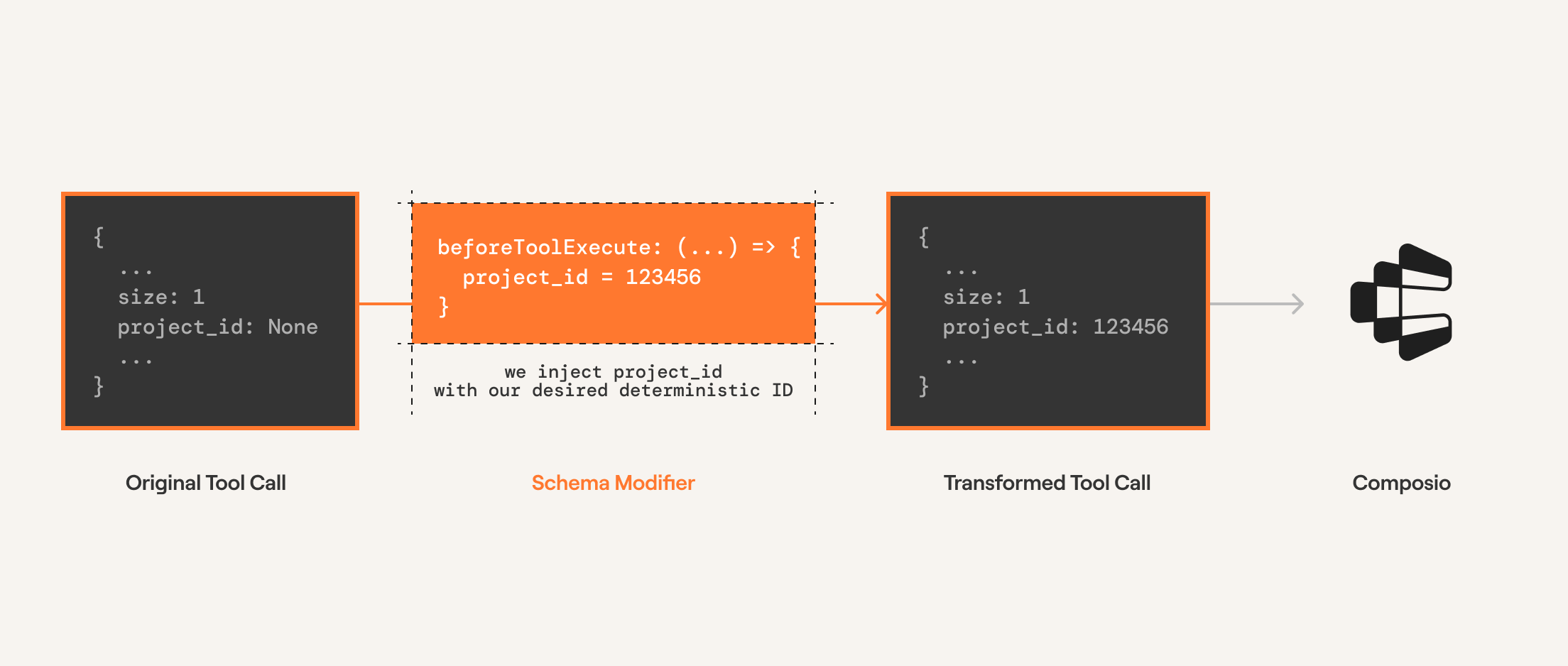
Before execution modifiers are part of Composio SDK's powerful middleware capabilities that allow you to customize and extend the behavior of tools.
These modifiers are called before the tool is executed by the LLM. This allows you to modify the arguments called by the LLM before they are executed by Composio.
Useful for:
Injecting an argument into the tool execution
Overriding the arguments emitted by the LLM
Below we use the beforeExecute modifier to modify the number of posts returned by HACKERNEWS_GET_LATEST_POSTS.
Since completion providers don't have a function execution step, Composio executes the tool call directly. The modifier is configured on the tools.execute method.
from openai import OpenAIfrom composio import Composio, before_executefrom composio.types import ToolExecuteParamscomposio = Composio()openai_client = OpenAI()user_id = "user@email.com"@before_execute(tools=["HACKERNEWS_GET_LATEST_POSTS"])def before_execute_modifier( tool: str, toolkit: str, params: ToolExecuteParams,) -> ToolExecuteParams: params["arguments"]["size"] = 1 return params# Get toolstools = composio.tools.get(user_id=user_id, slug="HACKERNEWS_GET_LATEST_POSTS")# Get response from the LLMresponse = openai_client.chat.completions.create( model="gpt-4o-mini", tools=tools, messages=[{"role": "user", "content": "Fetch latest posts from hackernews"}],)print(response)# Execute the function callsresult = composio.provider.handle_tool_calls( response=response, user_id="default", modifiers=[ before_execute_modifier, ],)print(result)
The `console` module provides a simple debugging console that is similar to the
JavaScript console mechanism provided by web browsers.
The module exports two specific components:
* A `Console` class with methods such as `console.log()`, `console.error()` and `console.warn()` that can be used to write to any Node.js stream.
* A global `console` instance configured to write to [`process.stdout`](https://nodejs.org/docs/latest-v24.x/api/process.html#processstdout) and
[`process.stderr`](https://nodejs.org/docs/latest-v24.x/api/process.html#processstderr). The global `console` can be used without importing the `node:console` module.
_**Warning**_: The global console object's methods are neither consistently
synchronous like the browser APIs they resemble, nor are they consistently
asynchronous like all other Node.js streams. See the [`note on process I/O`](https://nodejs.org/docs/latest-v24.x/api/process.html#a-note-on-process-io) for
more information.
Example using the global `console`:
```js
console.log('hello world');
// Prints: hello world, to stdout
console.log('hello %s', 'world');
// Prints: hello world, to stdout
console.error(new Error('Whoops, something bad happened'));
// Prints error message and stack trace to stderr:
// Error: Whoops, something bad happened
// at [eval]:5:15
// at Script.runInThisContext (node:vm:132:18)
// at Object.runInThisContext (node:vm:309:38)
// at node:internal/process/execution:77:19
// at [eval]-wrapper:6:22
// at evalScript (node:internal/process/execution:76:60)
// at node:internal/main/eval_string:23:3
const name = 'Will Robinson';
console.warn(`Danger ${name}! Danger!`);
// Prints: Danger Will Robinson! Danger!, to stderr
```
Example using the `Console` class:
```js
const out = getStreamSomehow();
const err = getStreamSomehow();
const myConsole = new console.Console(out, err);
myConsole.log('hello world');
// Prints: hello world, to out
myConsole.log('hello %s', 'world');
// Prints: hello world, to out
myConsole.error(new Error('Whoops, something bad happened'));
// Prints: [Error: Whoops, something bad happened], to err
const name = 'Will Robinson';
myConsole.warn(`Danger ${name}! Danger!`);
// Prints: Danger Will Robinson! Danger!, to err
```
Prints to `stdout` with newline. Multiple arguments can be passed, with the
first used as the primary message and all additional used as substitution
values similar to [`printf(3)`](http://man7.org/linux/man-pages/man3/printf.3.html)
(the arguments are all passed to [`util.format()`](https://nodejs.org/docs/latest-v24.x/api/util.html#utilformatformat-args)).
```js
const count = 5;
console.log('count: %d', count);
// Prints: count: 5, to stdout
console.log('count:', count);
// Prints: count: 5, to stdout
```
See [`util.format()`](https://nodejs.org/docs/latest-v24.x/api/util.html#utilformatformat-args) for more information.
Converts a JavaScript Object Notation (JSON) string into an object.
@paramtext A valid JSON string.@paramreviver A function that transforms the results. This function is called for each member of the object.
If a member contains nested objects, the nested objects are transformed before the parent object is.@throws{SyntaxError} If `text` is not valid JSON.
The `console` module provides a simple debugging console that is similar to the
JavaScript console mechanism provided by web browsers.
The module exports two specific components:
* A `Console` class with methods such as `console.log()`, `console.error()` and `console.warn()` that can be used to write to any Node.js stream.
* A global `console` instance configured to write to [`process.stdout`](https://nodejs.org/docs/latest-v24.x/api/process.html#processstdout) and
[`process.stderr`](https://nodejs.org/docs/latest-v24.x/api/process.html#processstderr). The global `console` can be used without importing the `node:console` module.
_**Warning**_: The global console object's methods are neither consistently
synchronous like the browser APIs they resemble, nor are they consistently
asynchronous like all other Node.js streams. See the [`note on process I/O`](https://nodejs.org/docs/latest-v24.x/api/process.html#a-note-on-process-io) for
more information.
Example using the global `console`:
```js
console.log('hello world');
// Prints: hello world, to stdout
console.log('hello %s', 'world');
// Prints: hello world, to stdout
console.error(new Error('Whoops, something bad happened'));
// Prints error message and stack trace to stderr:
// Error: Whoops, something bad happened
// at [eval]:5:15
// at Script.runInThisContext (node:vm:132:18)
// at Object.runInThisContext (node:vm:309:38)
// at node:internal/process/execution:77:19
// at [eval]-wrapper:6:22
// at evalScript (node:internal/process/execution:76:60)
// at node:internal/main/eval_string:23:3
const name = 'Will Robinson';
console.warn(`Danger ${name}! Danger!`);
// Prints: Danger Will Robinson! Danger!, to stderr
```
Example using the `Console` class:
```js
const out = getStreamSomehow();
const err = getStreamSomehow();
const myConsole = new console.Console(out, err);
myConsole.log('hello world');
// Prints: hello world, to out
myConsole.log('hello %s', 'world');
// Prints: hello world, to out
myConsole.error(new Error('Whoops, something bad happened'));
// Prints: [Error: Whoops, something bad happened], to err
const name = 'Will Robinson';
myConsole.warn(`Danger ${name}! Danger!`);
// Prints: Danger Will Robinson! Danger!, to err
```
Prints to `stdout` with newline. Multiple arguments can be passed, with the
first used as the primary message and all additional used as substitution
values similar to [`printf(3)`](http://man7.org/linux/man-pages/man3/printf.3.html)
(the arguments are all passed to [`util.format()`](https://nodejs.org/docs/latest-v24.x/api/util.html#utilformatformat-args)).
```js
const count = 5;
console.log('count: %d', count);
// Prints: count: 5, to stdout
console.log('count:', count);
// Prints: count: 5, to stdout
```
See [`util.format()`](https://nodejs.org/docs/latest-v24.x/api/util.html#utilformatformat-args) for more information.
The `console` module provides a simple debugging console that is similar to the
JavaScript console mechanism provided by web browsers.
The module exports two specific components:
* A `Console` class with methods such as `console.log()`, `console.error()` and `console.warn()` that can be used to write to any Node.js stream.
* A global `console` instance configured to write to [`process.stdout`](https://nodejs.org/docs/latest-v24.x/api/process.html#processstdout) and
[`process.stderr`](https://nodejs.org/docs/latest-v24.x/api/process.html#processstderr). The global `console` can be used without importing the `node:console` module.
_**Warning**_: The global console object's methods are neither consistently
synchronous like the browser APIs they resemble, nor are they consistently
asynchronous like all other Node.js streams. See the [`note on process I/O`](https://nodejs.org/docs/latest-v24.x/api/process.html#a-note-on-process-io) for
more information.
Example using the global `console`:
```js
console.log('hello world');
// Prints: hello world, to stdout
console.log('hello %s', 'world');
// Prints: hello world, to stdout
console.error(new Error('Whoops, something bad happened'));
// Prints error message and stack trace to stderr:
// Error: Whoops, something bad happened
// at [eval]:5:15
// at Script.runInThisContext (node:vm:132:18)
// at Object.runInThisContext (node:vm:309:38)
// at node:internal/process/execution:77:19
// at [eval]-wrapper:6:22
// at evalScript (node:internal/process/execution:76:60)
// at node:internal/main/eval_string:23:3
const name = 'Will Robinson';
console.warn(`Danger ${name}! Danger!`);
// Prints: Danger Will Robinson! Danger!, to stderr
```
Example using the `Console` class:
```js
const out = getStreamSomehow();
const err = getStreamSomehow();
const myConsole = new console.Console(out, err);
myConsole.log('hello world');
// Prints: hello world, to out
myConsole.log('hello %s', 'world');
// Prints: hello world, to out
myConsole.error(new Error('Whoops, something bad happened'));
// Prints: [Error: Whoops, something bad happened], to err
const name = 'Will Robinson';
myConsole.warn(`Danger ${name}! Danger!`);
// Prints: Danger Will Robinson! Danger!, to err
```
Prints to `stdout` with newline. Multiple arguments can be passed, with the
first used as the primary message and all additional used as substitution
values similar to [`printf(3)`](http://man7.org/linux/man-pages/man3/printf.3.html)
(the arguments are all passed to [`util.format()`](https://nodejs.org/docs/latest-v24.x/api/util.html#utilformatformat-args)).
```js
const count = 5;
console.log('count: %d', count);
// Prints: count: 5, to stdout
console.log('count:', count);
// Prints: count: 5, to stdout
```
See [`util.format()`](https://nodejs.org/docs/latest-v24.x/api/util.html#utilformatformat-args) for more information.
@sincev0.1.100
log(var JSON: JSON
An intrinsic object that provides functions to convert JavaScript values to and from the JavaScript Object Notation (JSON) format.
Converts a JavaScript value to a JavaScript Object Notation (JSON) string.
@paramvalue A JavaScript value, usually an object or array, to be converted.@paramreplacer An array of strings and numbers that acts as an approved list for selecting the object properties that will be stringified.@paramspace Adds indentation, white space, and line break characters to the return-value JSON text to make it easier to read.@throws{TypeError} If a circular reference or a BigInt value is found.
Agentic providers have a function execution step. The modifier is configured on the tools.get method which modifies the execution logic within the framework.
import { class Composio<TProvider extends BaseComposioProvider<unknown, unknown, unknown> = OpenAIProvider>
This is the core class for Composio.
It is used to initialize the Composio SDK and provide a global configuration.
Composio } from "@composio/core";import { class MastraProviderMastraProvider } from "@composio/mastra";constconst composio: Composio<MastraProvider>composio = newnew Composio<MastraProvider>(config?: ComposioConfig<MastraProvider> | undefined): Composio<MastraProvider>
Creates a new instance of the Composio SDK.
The constructor initializes the SDK with the provided configuration options,
sets up the API client, and initializes all core models (tools, toolkits, etc.).
@paramconfig - Configuration options for the Composio SDK@paramconfig.apiKey - The API key for authenticating with the Composio API@paramconfig.baseURL - The base URL for the Composio API (defaults to production URL)@paramconfig.allowTracking - Whether to allow anonymous usage analytics@paramconfig.provider - The provider to use for this Composio instance (defaults to OpenAIProvider)@example```typescript
// Initialize with default configuration
const composio = new Composio();
// Initialize with custom API key and base URL
const composio = new Composio({
apiKey: 'your-api-key',
baseURL: 'https://api.composio.dev'
});
// Initialize with custom provider
const composio = new Composio({
apiKey: 'your-api-key',
provider: new CustomProvider()
});
```
Composio({apiKey?: string | null | undefined
The API key for the Composio API.
@example'sk-1234567890'
apiKey: var process: NodeJS.Processprocess.NodeJS.Process.env: NodeJS.ProcessEnv
The `process.env` property returns an object containing the user environment.
See [`environ(7)`](http://man7.org/linux/man-pages/man7/environ.7.html).
An example of this object looks like:
```js
{
TERM: 'xterm-256color',
SHELL: '/usr/local/bin/bash',
USER: 'maciej',
PATH: '~/.bin/:/usr/bin:/bin:/usr/sbin:/sbin:/usr/local/bin',
PWD: '/Users/maciej',
EDITOR: 'vim',
SHLVL: '1',
HOME: '/Users/maciej',
LOGNAME: 'maciej',
_: '/usr/local/bin/node'
}
```
It is possible to modify this object, but such modifications will not be
reflected outside the Node.js process, or (unless explicitly requested)
to other `Worker` threads.
In other words, the following example would not work:
```bash
node -e 'process.env.foo = "bar"' && echo $foo
```
While the following will:
```js
import { env } from 'node:process';
env.foo = 'bar';
console.log(env.foo);
```
Assigning a property on `process.env` will implicitly convert the value
to a string. **This behavior is deprecated.** Future versions of Node.js may
throw an error when the value is not a string, number, or boolean.
```js
import { env } from 'node:process';
env.test = null;
console.log(env.test);
// => 'null'
env.test = undefined;
console.log(env.test);
// => 'undefined'
```
Use `delete` to delete a property from `process.env`.
```js
import { env } from 'node:process';
env.TEST = 1;
delete env.TEST;
console.log(env.TEST);
// => undefined
```
On Windows operating systems, environment variables are case-insensitive.
```js
import { env } from 'node:process';
env.TEST = 1;
console.log(env.test);
// => 1
```
Unless explicitly specified when creating a `Worker` instance,
each `Worker` thread has its own copy of `process.env`, based on its
parent thread's `process.env`, or whatever was specified as the `env` option
to the `Worker` constructor. Changes to `process.env` will not be visible
across `Worker` threads, and only the main thread can make changes that
are visible to the operating system or to native add-ons. On Windows, a copy of `process.env` on a `Worker` instance operates in a case-sensitive manner
unlike the main thread.
The tool provider to use for this Composio instance.
@examplenew OpenAIProvider()
provider: new
new MastraProvider({ strict }?: { strict?: boolean;}): MastraProvider
Creates a new instance of the MastraProvider.
This provider enables integration with the Mastra AI SDK,
allowing Composio tools to be used with Mastra AI applications.
@paramparam0@paramparam0.strict - Whether to use strict mode for tool execution@returnsA new instance of the MastraProvider@example```typescript
import { Composio } from '@composio/core';
import { MastraProvider } from '@composio/mastra';
const composio = new Composio({
apiKey: 'your-composio-api-key',
provider: new MastraProvider(),
});
```
Get a list of tools from Composio based on filters.
This method fetches the tools from the Composio API and wraps them using the provider.
@paramuserId - The user id to get the tools for@paramfilters - The filters to apply when fetching tools@paramoptions - Optional provider options including modifiers@returnsThe wrapped tools collection@example```typescript
// Get tools from the GitHub toolkit
const tools = await composio.tools.get('default', {
toolkits: ['github'],
limit: 10
});
// Get tools with search
const searchTools = await composio.tools.get('default', {
search: 'user',
limit: 10
});
// Get a specific tool by slug
const hackerNewsUserTool = await composio.tools.get('default', 'HACKERNEWS_GET_USER');
// Get a tool with schema modifications
const tool = await composio.tools.get('default', 'GITHUB_GET_REPOS', {
modifySchema: (toolSlug, toolkitSlug, schema) => {
// Customize the tool schema
return {...schema, description: 'Custom description'};
}
});
```
Function to intercept and modify tool execution parameters before the tool is executed.
This allows customizing the request based on tool-specific needs.